Hi everyone, in this post I would like to share some of the web pages I normally use in class with my children students as well as with teenagers or adults. Some of the main webpages/apps we use in class are the following: Plickers, Kahoot, Gonoodle, and some other pages such as the Bouncy Balls.
gonoodle.com Go Noodle: As I mentioned in a previous post Go Noddle is great to get kids moving. It has many videos divided into different categories such as: duration, energy level, and also coordination videos, kinesthetic learning, etc.
It is also a very easy-to-use page. Once you sign up, you need to choose a champ (there are many little monsters to choose from) sometimes, even students can choose them. These monsters grow as you watch the videos in class which is a fun thing for students to watch.
Pros: Gonoodle can be used as transitions, as a section in the class, as indoor recess activity, or as a reward after some work has been done. You can choose your favorite songs, therefore, control which videos students will choose in class (choose the short ones for transitions for example)
Cons: you need internet access, if internet is slow the videos will not play.
 |
| create and choose class |
 |
| My champ. You can change your champ with the icon on the left |
 |
| Choose from the different categories. |
https://getkahoot.com/ Kahoot: This is a GREAT app for reviewing content, and completing quizzes in class. The teacher enters Kahoot online and creates an account. You have some options for the activities you want to prepare; a quiz or a survey. Prepare the content at home and then get a code for that specific quiz. Once in class students go to
https://kahoot.it/ and enter the pin assigned for that quiz and can answer questions from their phone! great for group work or individual work.
Pros: Great app for group competition and also individual assessment of students. It is fun and engaging. Students (specially teens) get to use their phones in class for academic purposes.
Cons: both the teacher and the student need internet.
 |
| Students enter pin to play |
 |
| Choose activity |
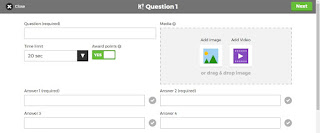 |
| Create questions |
plickers.com Plickers: I love Plickers for many reasons. One is that, I can create quizzes and review content with my students in a fun and engaging way. Students do not need internet! yes, you read it right. Plickers uses pictures similar to QR codes in order to play with students. Create an account and sign in. After that, prepare your quiz and enter the names of your students in order for the software to assign a picture to each student. The teacher must print the pictures and remember which student got which picture. Once you are in class you do need access to internet (the teacher) show the questions with a projector or computer and students must show the pictures (which are labeled with a,b,c,d on each corner) in order to get the right answer, the teacher scans the pictures with her phone and gets an answer from students.
Pros: students do not need a smartphone to play this. It is easy for the teacher to spot who gave a right or wrong answer since it is shown on the screen. It is fun and engaging.
Cons: sometimes if the teacher's phone is too slow it will not scan the pictures. This may lead the activity to be slow and boring.
 |
| Example of quiz prepared for a class |
 |
| Plicker cards that can be printed or bought from Amazon |
 |
| Class: teacher adds students names and assigns a card to each |
https://bouncyballs.org/ Bouncy Balls: This is my favorite classroom management tool. I usually use it whenever I need the class to be in complete silence for, maybe silent reading or resting time. Very easy to use, just click on the link and click on start bouncing! This page uses your microphone and catches the noise of the class which makes the balls to bounce. The less the noise the less the bouncing!
Pros: students love it! easy to use.
Cons: you need internet connection. It sometimes doesn't work, instead of getting students to be more silent they become noisier since they love to see the balls bounce! It is worth the try anyway =)
 |
| Begin Bouncing! |

 Posts
Posts